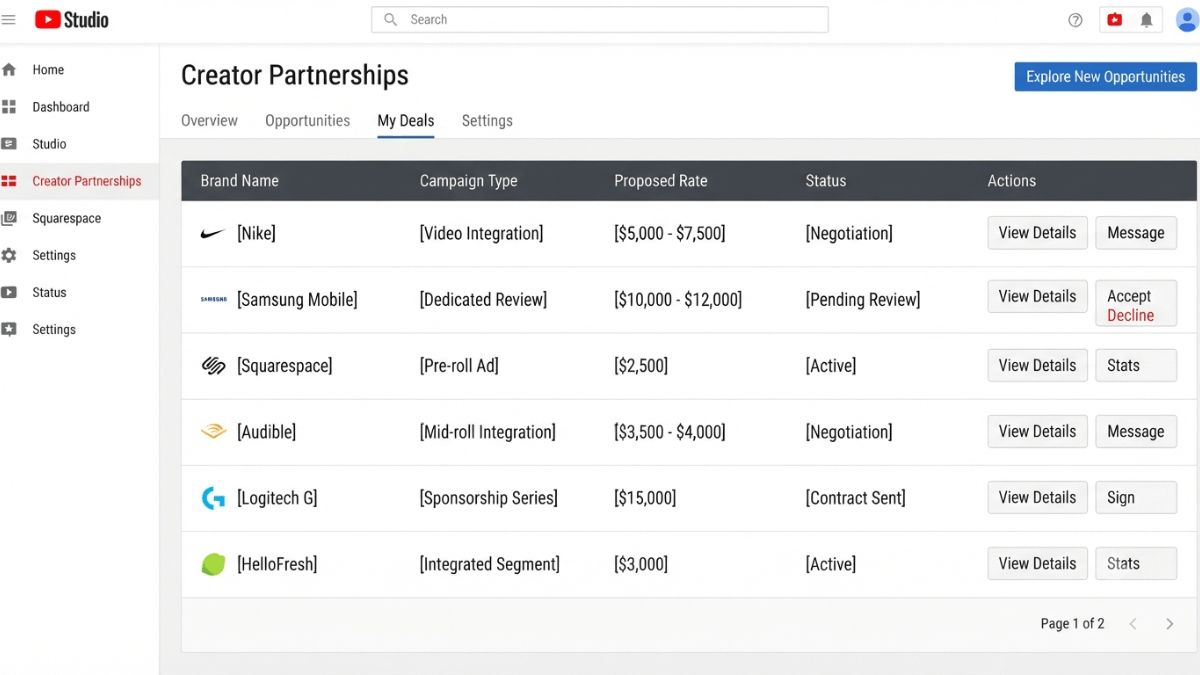
To land profitable YouTube sponsorships: use the Creator Partnerships tab in YouTube Studio (requires YPP, age 18+, and eligible countries including Saudi Arabia and UAE) to receive brand deal inquiries directly. Any creator — in YPP or not — can also report a brand deal on a video during upload. Every sponsorship involving compensation requires enabling the "contains paid promotion" checkbox in YouTube Studio per platform policy.
| Method | Requires YPP? | Geographic restriction? | YouTube mediates payment? |
|---|---|---|---|
| Creator Partnerships (receive inquiries) | Yes | Yes — specific countries | No — directly with brand |
| Report an existing brand deal | No (any creator) | No | No |
| Search for a brand to link | Yes | No | No |
| Independent sponsorship (direct outreach) | No | No | No |
Key takeaways:
- Per YouTube's Creator Partnerships page, Saudi Arabia and UAE are among the eligible countries for the Creator Partnerships tab — giving YPP creators in those markets a direct channel to receive brand inquiries inside YouTube Studio.
- YouTube does not mediate payment for brand deals — all negotiation, contracts, and payments happen directly between the creator and the brand.
- Per YouTube's paid promotion policy, any sponsorship involving compensation (money or free products) requires enabling the "contains paid promotion" checkbox in YouTube Studio.
- Reporting a brand deal (tagging the sponsoring brand in video settings) is available to any creator regardless of YPP — but searching for a brand to link requires YPP.
- Enabling Channel Insights Sharing is optional but increases your visibility to brands searching for creators through Creator Partnerships.
What is the Creator Partnerships tab and how does it work?
According to YouTube's official Creator Partnerships page, Creator Partnerships is a tool built into YouTube Studio that enables brands to discover eligible creators and send brand deal inquiries directly. The tab surfaces automatically in the Earn section for eligible YPP creators.
Eligibility requirements
Per the official page (verify current requirements before acting):
- Be in YPP and eligible for ad revenue sharing
- Be at least 18 years old
- Be based in one of the currently available countries: Australia, Brazil, Canada, France, Germany, India, Indonesia, Israel, Italy, Japan, Mexico, Netherlands, New Zealand, Philippines, Saudi Arabia, Singapore, South Korea, Spain, Switzerland, Turkey, UAE, United Kingdom, United States
- No active Community Guidelines strikes
What the tab provides
- Streamlined inquiries: Brand deal offers arrive directly in the tab with campaign details and suggested payment amounts.
- Customizable Media Kit: Presents your audience data and channel performance metrics to brands for more effective pitching.
- Set preferred rates: Define your suggested rates for long-form video and Shorts partnerships as a starting point for brands.
- Secondary business contact: Add an agent or manager's email to receive copies of all inquiries.
⚠️ YouTube facilitates discovery — payment is direct
Per the official page, when you express interest in a brand deal inquiry, YouTube shares your contact details with the brand to reach you directly. All negotiation, contract signing, and payment happen between you and the brand — YouTube does not intermediate or guarantee payment.
What is the difference between "reporting a brand deal" and "searching for a brand"?
Per the official Creator Partnerships page, video settings offer two distinct actions during upload or edit:
- Reporting an existing brand deal (available to any creator): During video upload or edit, any creator — regardless of YPP — can indicate that a video contains a brand partnership by selecting the brand from suggested options. This lets the brand measure the sponsored content's performance.
- Searching for a brand to link (requires YPP): YPP creators can search for a specific brand name and initiate a brand partner access request — an option not available to non-YPP creators.
When and how must you disclose a YouTube sponsorship?
According to YouTube's paid promotion policy, if you receive compensation — money or free products — in exchange for featuring a brand or product, you must:
- Enable the "My video contains paid promotion" checkbox in YouTube Studio → Content → More options. YouTube automatically adds a disclosure notice at the start of the video.
- Disclose clearly at the beginning of the video itself — community convention and advertising laws in many countries require explicit verbal or on-screen disclosure independently of YouTube's checkbox.
If a product was purchased independently with no agreement with the company, YouTube's paid promotion disclosure requirement does not apply from the platform's side — but verify local advertising law in your country.
How do you get sponsorships if you are not yet in YPP?
Per YouTube's brand deal tips page, several paths to sponsorships do not require YPP:
📋 Paths to sponsorships
- Creator Partnerships (requires YPP): Activate the tab, set preferred rates, and wait to be discovered by brands.
- Direct outreach to brands: Contact brands directly through their website or social media — no YPP required. YouTube's own tips page explicitly mentions direct outreach as a valid path. See our affiliate marketing guide to compare sponsorships with affiliate programs.
- Third-party platforms: External creator-brand marketplace platforms exist with varying eligibility requirements depending on the platform.
- Building a strong Media Kit: Per YouTube's page, a Media Kit with audience insights and channel performance data is essential for pitching to brands — available natively through Creator Partnerships for YPP creators, and buildable independently by any creator.
What should you discuss with a sponsoring brand before agreeing?
Per YouTube's Creator Partnerships page, brand deal inquiries received through the tab include several elements worth reviewing carefully:
- Suggested amount: The page explicitly states that amounts provided in the inquiry "are not meant to be confused with final offers" — treat them as a starting point for negotiation.
- Campaign details: What product, what key talking points, what call to action, and what specific deliverables are required.
- Payment terms: Method and timeline — negotiate directly with the brand since YouTube is not involved.
- Content usage rights: Whether the brand can use your video in their advertising campaigns — this is the subject of Brand Partner Access and is negotiated separately.
Common mistakes when handling YouTube brand deals
❌ Mistake 1: Not enabling the paid promotion disclosure checkbox
Per YouTube's paid promotion policy, any compensation — including free products — requires enabling the disclosure checkbox in YouTube Studio video settings. Omitting this can result in content removal or account action. Track sponsored content performance in YouTube Analytics.
❌ Mistake 2: Accepting Brand Partner Access without understanding what it grants
Per the official page, accepting a Brand Partner Access request allows the brand to view your video's organic performance metrics in Google Ads and use it in advertising campaigns. This is your decision to make — understand what you are consenting to before accepting.
❌ Mistake 3: Overloading the channel with sponsored content
Per YouTube's brand deal tips, posting too much sponsored content can negatively affect viewer experience. YouTube's own guidance recommends being mindful of frequency and ensuring sponsored content aligns with your channel's niche and what your audience actually values.
Frequently asked questions
Can you get brand sponsorships without being in YPP?
Yes. Independent sponsorships — negotiated directly with brands without YouTube's involvement — do not require YPP. Reporting an existing brand deal in video settings is also available to any creator. What requires YPP is the Creator Partnerships tab (for receiving inbound inquiries) and the ability to search for a specific brand to link to a video.
Does YouTube take a percentage of brand deal payments?
Per YouTube's Creator Partnerships page, YouTube does not intermediate or take a share of brand deal payments. The Creator Partnerships tab connects creators with brands, but all negotiation, contracts, and payments happen directly between the creator and the sponsoring brand.
Does receiving a free product from a brand require disclosure?
Yes. Per YouTube's paid promotion policy, receiving free products from a brand in exchange for featuring them in content constitutes a commercial relationship requiring disclosure. You must enable the paid promotion checkbox in YouTube Studio video settings regardless of whether the compensation is monetary or in-kind.
Can an agent or manager manage Creator Partnerships on a creator's behalf?
Yes. Per the Creator Partnerships page, creators can configure a secondary business contact email (for an agent or manager) to receive copies of all brand deal inquiries. Creators can also add agents or managers as authorized users in YouTube Studio to manage deals directly on their behalf.
How do the suggested amounts in Creator Partnerships inquiries compare to actual rates?
Per YouTube's Creator Partnerships page, the amounts shown in brand deal inquiries are provided by the advertiser and explicitly described as "not meant to be confused with final offers." They serve as a starting point for negotiation. You can set your own preferred rates in the Creator Partnerships tab Preferences, which signals to brands what you expect before they reach out.