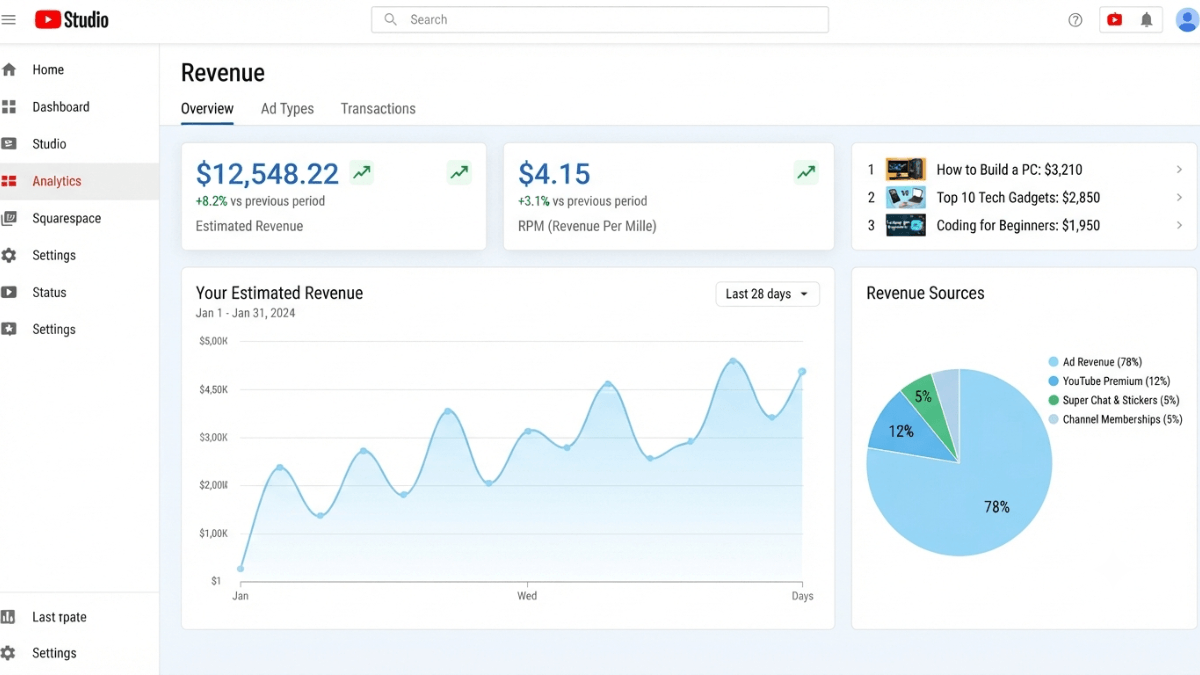
No external YouTube earnings calculator is accurate — the only precise source is your own channel's YouTube Analytics. The metric closest to your actual earnings is RPM (revenue per 1,000 views after YouTube's share), not CPM. RPM includes all revenue sources and varies by content type, viewer geography, season, and audience. External calculators use generic averages that have no connection to your specific channel.
| Metric | Official definition | Includes | Before or after YouTube's share? |
|---|---|---|---|
| RPM | Your revenue per 1,000 views | Ads + memberships + Supers + Premium | After YouTube's share |
| CPM | What advertisers pay per 1,000 ad impressions | Ads only | Before YouTube's share |
| Estimated revenue | Sum of all revenue sources | All sources | Appears in Analytics after 2 days — subject to adjustment |
| Finalized revenue | Confirmed, processed earnings | After tax deductions and refunds | In AdSense for YouTube only (7th–12th of following month) |
Key takeaways:
- Per YouTube's ad revenue analytics page, RPM is always lower than CPM because it is calculated after YouTube's revenue share and includes all views, including unmonetized ones.
- Per YouTube's partner earnings overview, the creator's share is 55% from Watch Page ads, 45% from Shorts Feed ads, and 70% from fan funding features.
- Estimated revenue in Analytics is adjusted twice — after one week, then mid-following-month. Finalized earnings appear in AdSense for YouTube only.
- RPM fluctuates naturally with season, viewer geography, and available ad formats — per the official page, this fluctuation is normal and expected.
- External calculators use broad industry averages with no connection to your specific content niche, audience demographics, or viewing geography. Your channel's own RPM in Analytics is the only reliable reference.
What is the real difference between RPM and CPM and why does it matter?
According to YouTube's official ad revenue analytics page:
- CPM (Cost Per Mille) = an advertiser-focused metric showing what advertisers pay. It includes ads only, is calculated before YouTube's revenue share, and counts only ad impressions — not all views.
- RPM (Revenue Per Mille) = a creator-focused metric showing your actual earnings. It includes ads, channel memberships, YouTube Premium, Super Chat, and Super Stickers; is calculated after YouTube's revenue share; and counts all views including unmonetized ones.
Why is RPM always lower than CPM?
Per the official page, RPM is lower than CPM for two reasons: first it is calculated after deducting YouTube's share (the creator keeps 45–70% depending on revenue type), and second it includes all views — including views that had no ad available, views from Premium subscribers, and views on content not eligible for ads.
Numerical example (based on official documentation)
A video is watched 10,000 times; 8,000 of those views included an ad:
- Total views: 10,000
- Monetized playbacks: 8,000
- If CPM = $5 → advertiser revenue = $5 × 8 = $40
- After YouTube's 55% Watch Page share → your cut = $22
- RPM = ($22 ÷ 10,000) × 1,000 = $2.20
- While CPM = $5.00
Why are external YouTube earnings calculators inaccurate?
External calculators produce a number based on view count — but per YouTube's official analytics page, your actual RPM is shaped by factors no calculator can know:
- Viewer geography: Advertisers choose which countries to target. CPM in the US or Western Europe differs substantially from CPM in other regions. A calculator cannot know where your viewers are located.
- Content topic: Personal finance and technology content attracts advertisers willing to pay more than general entertainment. A calculator cannot know what your videos discuss.
- Seasonality: Per YouTube's official page, advertisers bid higher before holidays and lower in early Q1. A calculator uses an annual average, not a month-specific estimate.
- Monetized playback rate: Not every view carries an ad. Videos with stronger advertiser-friendly compliance have higher monetized playback rates — this ratio varies per channel and per video.
- Revenue source mix: Your channel may earn through memberships or Super Chat alongside ads — these raise RPM without changing CPM. A calculator based on views alone misses this entirely.
Where do you find your actual earnings data on YouTube?
According to YouTube's check your revenue page, earnings are split between two sources:
1. YouTube Analytics — estimated revenue
📋 How to reach your revenue reports
- Open YouTube Studio → Analytics.
- From the top menu, select the Revenue tab.
- You will find: total earnings for the past 6 months by month, RPM, and a breakdown by revenue source (Watch Page ads, Shorts Feed ads, memberships, Supers, Connected Stores, Shopping affiliates).
- For RPM and CPM per video: go to the top-earning content report.
Important note per the official page: revenue takes 2 days to appear in Analytics. It then undergoes two adjustments — one after a week, and another in the middle of the following month.
2. AdSense for YouTube — finalized revenue
Finalized earnings (after tax deductions, member refunds, and invalid traffic adjustments) appear only in your AdSense for YouTube account between the 7th and 12th of the following month. Per YouTube's Help Center, finalized earnings in AdSense may differ from estimated earnings in Analytics due to tax withholding and other adjustments.
How do you estimate future YouTube earnings accurately?
The only reliable method for projecting your earnings is using your channel's own data — not industry benchmarks:
Estimation formula using your own data
Step 1: In YouTube Analytics → Revenue, find your channel's average RPM over the past 90 days.
Step 2: From Analytics, find your average monthly view count.
Step 3: Estimate = (average monthly views ÷ 1,000) × average RPM.
Example: 100,000 monthly views × $3 RPM = estimated $300/month from all tracked revenue sources.
⚠️ Estimation is for planning — not financial guarantees
Per YouTube's partner earnings page, there are no guarantees in the YouTube partner program about how much in the YouTube partner agreement about how much or whether you will be paid. Revenue is only confirmed once it appears in your AdSense for YouTube account.
What affects your channel's RPM and how can you improve it?
Per YouTube's official analytics page, you can raise RPM through:
- Enabling ads on all eligible videos: Videos with ads turned off contribute zero to your RPM from ad revenue.
- Enabling mid-roll ads: Adds more ad impressions per view on long-form videos, increasing revenue per view.
- Diversifying revenue sources: Per the official page, enabling channel memberships and Supers raises RPM because they add revenue without requiring more views. You may see RPM rise with no change in view count simply because new members joined.
Frequently asked questions
How much does YouTube pay per 1,000 views?
YouTube does not publish fixed RPM or CPM figures for any content category or region — these change constantly based on content topic, viewer geography, season, and advertiser demand. The only accurate figure for your channel is your own RPM in YouTube Analytics. Any number cited online is a generic industry average with no direct relevance to your specific channel.
Why do my Analytics earnings differ from my AdSense balance?
Per YouTube's Help Center, earnings in Analytics are estimates subject to two adjustments before becoming final. Finalized earnings in AdSense may differ due to tax withholding, reversal of membership refunds, and removal of invalid traffic revenue. AdSense for YouTube is the definitive record of what you will actually be paid.
Does a declining RPM mean my channel is performing worse?
Not necessarily. Per YouTube's official page, RPM can fall when total views increase faster than monetized views — your total revenue may actually be higher even as RPM drops. RPM also naturally varies with season, shifts in viewer geography, and changes in available ad formats. A falling RPM on a growing channel often reflects an expanding audience that includes more non-monetized views, not a drop in channel health.
Will the estimated revenue shown in Analytics be exactly what I receive?
No. Per YouTube's Help Center, estimated revenue in Analytics undergoes two adjustments before becoming final. Finalized earnings in AdSense for YouTube may be lower than Analytics estimates due to tax withholding, invalid traffic deductions, and membership refunds charged back to the creator's account. The finalized amount in AdSense — not the Analytics estimate — is what gets paid out.
Why do some videos on the same channel have a much higher RPM than others?
Per YouTube's official analytics page, CPM varies by content topic, viewer geography, and available ad formats. A video that attracts viewers from a high-CPM region or covers a topic that advertisers bid heavily on (personal finance, technology, business) will earn a higher RPM than a general entertainment video with a broader, more geographically diverse audience. This is why cross-video RPM comparison within your Analytics is more useful than comparing your RPM to industry averages.