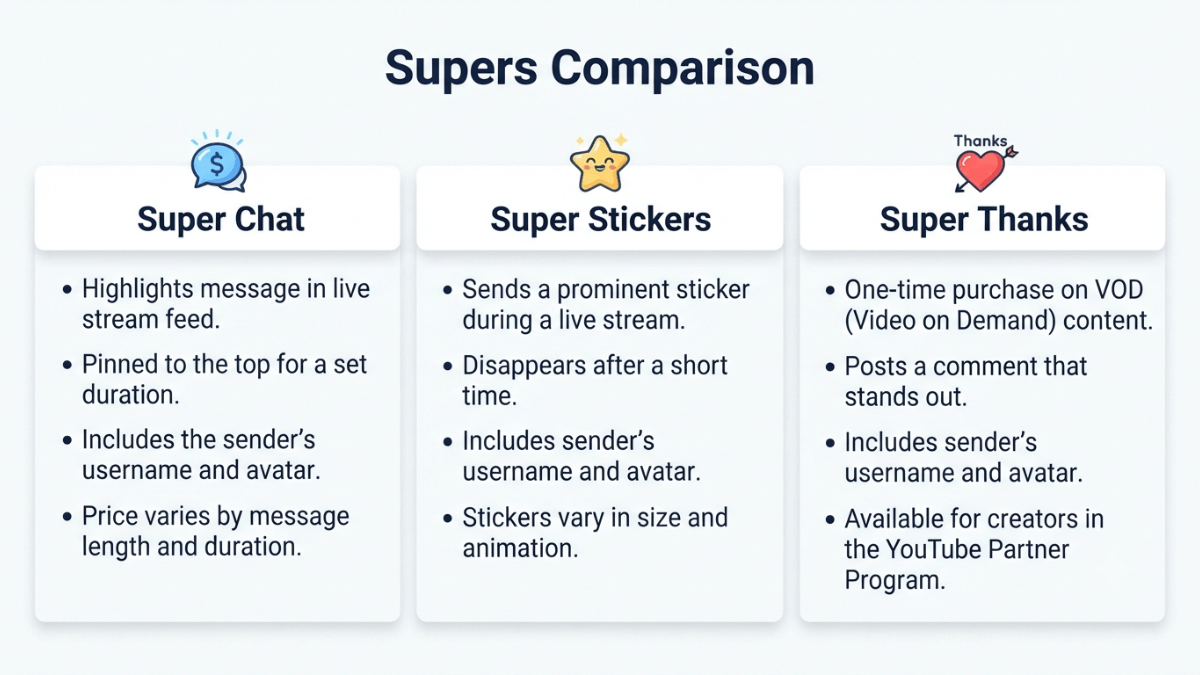
Super Chat, Super Stickers, and Super Thanks are three fan funding tools in the YouTube Partner Program (YPP), all requiring Commerce Product Module (CPM) acceptance. The key distinction: Super Chat and Super Stickers work only during live streams and Premieres (highlighted messages and animated images in live chat), while Super Thanks works on long-form videos and Shorts (a one-time animation plus a highlighted comment). The creator revenue share is 70% for all three.
| Aspect | Super Chat | Super Stickers | Super Thanks |
|---|---|---|---|
| Where it works | Live streams and Premieres only | Live streams and Premieres only | Long-form videos and Shorts only |
| What the viewer gets | Highlighted pinned message in live chat | Animated image in live chat | One-time animation + highlighted comment |
| Creator revenue share | 70% after taxes and iOS fees | 70% after taxes and iOS fees | 70% after taxes and iOS fees |
| Requires YPP? | Yes + CPM | Yes + CPM | Yes + CPM |
| Geographic restriction? | Yes — specific countries | Yes — specific countries | Yes — specific countries (same list) |
Key takeaways:
- All three require YPP and separate acceptance of the Commerce Product Module (CPM) in YouTube Studio → Earn. They can be enabled individually or together.
- Super Chat and Super Stickers are unavailable when live chat is disabled or when content is set as Made for Kids.
- Super Thanks is unavailable on videos or Shorts with Content ID claims — a restriction that does not apply to Super Chat.
- Super Thanks does not work during a live stream or Premiere while live — but it does work on the archived recording after the stream ends.
- Per YouTube's Help Center, the 70% is calculated after local sales taxes and iOS App Store fees are deducted. Transaction costs including credit card fees are currently covered by YouTube.
What is Super Chat and how does it work?
According to YouTube's official Super Chat and Super Stickers eligibility page, Super Chat lets viewers purchase a highlighted message in the live chat feed during a live stream or Premiere. The length of time a Super Chat stays pinned at the top of the chat depends on the purchase amount — a higher amount means a longer pin duration.
Eligibility
To qualify for Super Chat and Super Stickers (verify current requirements at the Help Center before acting):
- Be in YPP and meet the minimum requirements for fan funding features
- Live in one of the available locations — the full list is on the official eligibility page
- Accept the Commerce Product Module (CPM)
When Super Chat is unavailable
Per the official page, Super Chat and Super Stickers are not available on:
- Age-restricted, private, or unlisted videos
- Content set as Made for Kids
- Live streams or Premieres associated with YouTube Giving fundraisers
- Any live stream where live chat or comments are disabled
Revenue share
According to YouTube's Super Chat and Super Stickers management page, creators receive 70% of Supers revenue confirmed by Google. This is calculated after local sales taxes and iOS App Store fees are deducted. Transaction costs including credit card fees are currently covered by YouTube.
How do Super Stickers differ from Super Chat?
Super Stickers are animated images a viewer purchases to appear in the live chat feed during a live stream or Premiere — instead of the custom text message in Super Chat. Per YouTube's official page, the eligibility requirements, available countries, and creator revenue share (70%) are identical to Super Chat.
The practical difference: Super Chat lets the viewer write a custom message, while Super Stickers are pre-made animated images the viewer selects. Both give the viewer a prominent appearance in the live chat for a duration that depends on the purchase amount.
What is Super Thanks and how does it differ from Super Chat?
According to YouTube's official Super Thanks eligibility page, Super Thanks lets viewers show gratitude for long-form videos and Shorts. The viewer purchases a one-time animation that appears only to them over the video, and as a bonus they get to post a distinct, colorful, customizable comment in the comments section.
The core difference between Super Chat and Super Thanks
- Super Chat: Works during live streams and Premieres — a pinned message in the live chat feed.
- Super Thanks: Works on long-form videos and Shorts — a highlighted comment in the comments section.
- Super Thanks on archived streams: Once a live stream ends and is saved as a video, viewers can send Super Thanks on the archive — unlike during the live broadcast itself.
Super Thanks eligibility
Per the official page, requirements are similar to Super Chat with one important difference:
- YPP + CPM + eligible country (same list as Super Chat)
- Channel not set as Made for Kids, without a significant number of ineligible videos
- Some music channels (such as those under SRAV contracts) are not currently eligible
When Super Thanks is unavailable
Per the official eligibility page, Super Thanks is not available on:
- Age-restricted, private, or unlisted videos
- Content set as Made for Kids
- Videos or Shorts with Content ID claims
- Videos or Shorts associated with YouTube Giving fundraisers
- Live streams and Premieres while live (available on the archived video afterward)
- Videos or Shorts with comments disabled
⚠️ Content ID claims block Super Thanks — but not Super Chat
A nuance documented in YouTube's official pages: Super Thanks is unavailable on videos with Content ID claims. Super Chat does not carry this same restriction — its limitations are tied to live chat status and audience settings. If a video on your channel has a music claim, Super Thanks will not appear on it even if your channel is fully eligible.
How do you enable Super Chat, Super Stickers, and Super Thanks?
According to YouTube's official Super Thanks management page, all three tools are enabled from the same location:
📋 Activation steps
- Open YouTube Studio and go to Earn.
- Click the Supers tab — it will only appear if your channel is eligible.
- If this is your first time, follow the on-screen instructions to sign the Commerce Product Module (CPM).
- After accepting the CPM, you will see independent on/off switches for: Super Chat, Super Stickers, and Super Thanks.
- You can enable any of them independently — you do not need to activate all three together.
Once enabled: Super Chat and Super Stickers appear automatically on all eligible live streams and Premieres. Super Thanks appears automatically on all eligible long-form videos and Shorts — both previously uploaded and future ones.
How do you reply to a Super Thanks comment with a Short?
Per YouTube's Super Thanks management page, YouTube offers a "Comment Sticker" feature — you can reply to a Super Thanks comment by creating a Short in which the viewer's comment appears as a sticker. Steps:
- Open the YouTube app on mobile.
- Go to the watch page of the video or Short with the Super Thanks comment.
- Open the comments feed and find the Super Thanks comment.
- Tap Reply → Create a Short.
- During Shorts creation, you can drag to reposition or pinch to resize the comment sticker.
How do you track Supers revenue in YouTube Analytics?
Per YouTube's Help Center, Supers revenue appears in two places:
- Super Chat and Super Stickers: In YouTube Studio → Earn → Supers, you can see all purchases from the past 30 days. During a live stream, you can filter the live chat to show only fan funding purchases.
- Super Thanks: In YouTube Analytics → Revenue → How you make money → Supers. You can also filter comments in YouTube Studio using the "From Super Thanks" filter.
Common mistakes when activating Supers features
❌ Mistake 1: Expecting Supers to activate automatically after joining YPP
Joining YPP does not automatically enable Supers. Per YouTube's Help Center, you must separately accept the Commerce Product Module (CPM) in YouTube Studio → Earn → Supers, then enable each feature using its individual switch. For the full context on YouTube monetization, see our complete YouTube monetization guide.
❌ Mistake 2: Expecting Super Thanks on a video with a Content ID claim
Per YouTube's official Super Thanks eligibility page, videos and Shorts with Content ID claims are not eligible for Super Thanks. If you use music that triggers a Content ID claim, Super Thanks will not appear on that video even if your channel is otherwise eligible.
❌ Mistake 3: Disabling comments and expecting Super Thanks to remain active
Super Thanks is unavailable on videos with comments disabled, because the highlighted comment is a core part of the viewer experience. Similarly, Super Chat and Super Stickers stop working if live chat is disabled during a stream. Keeping comments and live chat open is a prerequisite for all three features.
Frequently asked questions
Can Super Thanks be enabled without enabling Super Chat?
Yes. Per YouTube's Help Center, after accepting the Commerce Product Module (CPM), you will see independent on/off switches for Super Chat, Super Stickers, and Super Thanks. Each can be enabled or disabled independently — you do not need to activate all three simultaneously.
Does Super Chat work on YouTube Premieres?
Yes. Per YouTube's Help Center, Super Chat and Super Stickers work on both live streams and Premieres, provided live chat is enabled and the channel meets eligibility requirements. Super Thanks, by contrast, is not available during a Premiere while it is live — but it does become available on the video once the Premiere ends.
If a Super Chat is removed for violating policies, does the creator keep the revenue?
No. Per YouTube's Help Center, if a Super Chat or Super Sticker is moderated and removed for violating Community Guidelines, YouTube donates its portion of the revenue to charity. The creator's portion of that specific transaction is also affected — reviewing Community Guidelines before each stream helps avoid this outcome.
Is there a limit to how much a viewer can spend on Super Thanks per day?
Per YouTube's Help Center (Super Thanks purchase page), there is a daily and weekly spending limit for each viewer that varies by country. Generally, viewers can spend up to $500 USD per day or $2,000 USD per week (or the equivalent in local currency) across Super Chat, Super Stickers, and Super Thanks. This limit applies to the viewer and does not affect the creator's ability to receive Supers.
Does Super Thanks work on Shorts that have music in them?
It depends on whether the music triggers a Content ID claim. Per YouTube's official Super Thanks eligibility page, Shorts with Content ID claims are not eligible for Super Thanks. Music that has been cleared through YouTube's Creator Music or that does not generate a claim will not block Super Thanks. If a music claim is applied to your Short, Super Thanks will be unavailable on that specific Short.
Official sources
- YouTube Help — Super Chat & Super Stickers eligibility, availability, and policies
- YouTube Help — Manage Super Chat & Super Stickers for Live Chat (70% revenue share)
- YouTube Help — Super Thanks eligibility, availability, and policies
- YouTube Help — Turn on and manage Super Thanks
- YouTube Help — YouTube Commerce Products monetization policies (fan funding & CPM)