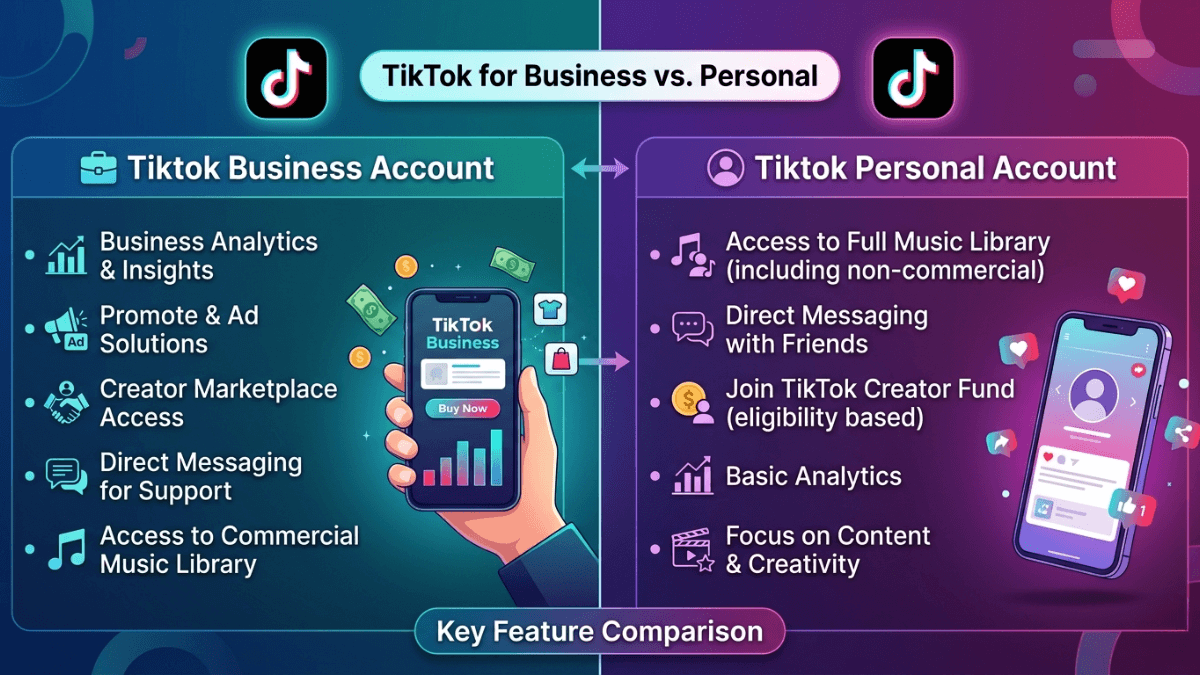
The meaningful difference is the publisher, the music rights, the tools and the earning routes attached to each type. It is not a documented algorithm preference for one account label.
Direct answer: choose a Personal Account when the account represents an individual creator. It is the only type TikTok says is eligible for the Creator Rewards Program, and it is the type that sees the full sound library. Choose a Business Account when the account represents a brand, shop or service, because that is the type that unlocks Business Suite, the Commercial Music Library and the link to TikTok Ads Manager. Do not switch type to chase reach: TikTok documents no distribution penalty tied to the account label.
One scope note: this is a decision page, and it sits inside the wider path of how to grow on TikTok.
Feature comparison
Official fact. The table below is taken from TikTok's Creator Academy article "Choosing the right TikTok account for you", published 17 June 2026, plus the related eligibility and sound-library articles, all read on 17 August 2026.
| Feature | Personal Account | Business Account |
|---|---|---|
| Who it represents | An individual, creator, artist or public figure | A brand, shop, organization or service |
| Sound library | Unlimited Sound Library, which TikTok describes as 80,000+ authorized sounds with no limit on usage duration or number of uses | The "Unlimited" tab is not available on business accounts; the official alternative is the Commercial Music Library, described as over a million tracks |
| Creator Rewards Program | Eligible, subject to the other conditions | Explicitly not eligible |
| Other earning routes | TikTok lists Subscription, TikTok Shop and LIVE Gifts as Personal Account earning routes, with availability varying by region | TikTok does not list them among Business Account features; check in-app |
| Analytics | Analytics and LIVE Analytics | The same, plus Business Analytics inside Business Suite |
| Type-specific tools | Creator tools and creator programs | Profile Attributes, Business Page, Lead Generation, Auto-Message, TikTok Ads Manager connection |
| Website link in profile | Available at 1,000+ followers | Available with a Registered Business Account |
TikTok also states that a set of features is shared regardless of which type you pick: Analytics, LIVE Analytics, Playlists, Promote and the Branded Content Toggle. So the choice is not "tools" versus "no tools".
Limit on this table: screen labels and feature availability vary by country and app version. Check the live settings in the target account before deciding.
What happened to the Creator account?
This keeps coming up because the Help Center URL is still called "switching to a Creator or Business account". The current position is clearer: TikTok's Creator Academy states that the platform offers two account types, Personal and Business. The Creator account is no longer a separate third type; the name survives only in the old support URL.
Practical interpretation: if you find a comparison laid out in three columns, it is describing an older interface. Today the decision is binary.
Music is the clearest operational difference
This is the line in the table that changes daily work, and it is the reason behind "why did the trending sounds disappear from my account".
In its explanation of the Unlimited Sound Library, TikTok states that the "Unlimited" tab is not available if you are using a business account, and points business accounts to the Commercial Music Library instead. The reason is licensing, not distribution: much of the general music library is not cleared for commercial use.
Even on a Personal Account, checking rights remains your responsibility when you promote a product or a service.
Which account type each earning route requires
For many accounts this is the line that decides it. Only what TikTok documents:
- Creator Rewards Program. The eligibility page states that only Personal Accounts qualify, and that Business Accounts, accounts associated with organizations, and accounts associated with political or government institutions do not. The same page gives the way back: Settings and privacy, then Account, then "Switch to personal account", after which you can apply 30 days later.
- Subscription, TikTok Shop and LIVE Gifts. TikTok presents these as Personal Account earning routes and notes that availability of these programs differs by region.
- Paid ads. A Business Account route, through the TikTok Ads Manager connection. That is paid distribution and is entirely separate from organic reach.
The routes themselves, and what each one requires, are compared in how to make money on TikTok. This page only answers "which account type do I need".
Choose a Personal Account when
The account is built around a creator, expert or public-facing individual, needs broader sound choice, or depends on the Creator Rewards Program. Identity and positioning after that belong in the personal branding guide.
Choose a Business Account when
The account represents a company, store or service and ongoing commercial promotion is the point, or when you specifically need commercially cleared music, lead forms, auto-messaging, or an Ads Manager connection. TikTok also states that the profile website link opens up with a Registered Business Account, or at 1,000+ followers on any account.
Does a Business Account reduce reach?
TikTok documents no automatic distribution penalty tied to the account type. Performance can still change after a switch for a different reason: the available sounds changed, so the kind of content you can make changed with them. Separate correlation from cause and review Analytics before blaming the label.
How should you make the decision?
Ask five questions in this order:
- Who does the account actually represent?
- Is ongoing commercial promotion a core purpose?
- What music does the content need?
- Does your income depend on the Creator Rewards Program?
- Do business tools and team workflows matter more than sound flexibility?
When the answers conflict, separating a brand account from a founder account is cleaner than forcing one account to serve two purposes.
Before and after switching
Record the tools, sounds, links and features you use today. TikTok describes the switch path as: Profile, then the three-line menu, then "Settings and privacy", then "Account", then "Switch to Business Account", then registering through Business Registration.
Two documented consequences are worth knowing first:
- Switching from Business back to Personal means waiting 30 days before you can apply to the Creator Rewards Program.
- Changing account type invalidates a verified badge and requires a new application. Details in how TikTok verification works.
After the change, review the setup with the TikTok profile optimization guide, and do not switch type repeatedly.
Frequently asked questions
When is a Personal Account the better choice?
When the account represents an individual creator, when you need the full sound library, or when you depend on the Creator Rewards Program, which TikTok states is exclusive to Personal Accounts.
When is a Business Account the better choice?
When the account represents a company, store or service and needs commercially cleared music plus tools such as lead generation, auto-messaging and an Ads Manager connection.
Does switching to a Business Account hurt reach?
TikTok does not document a reach penalty caused by the account-type switch itself. If performance changes, review content, available sounds, audience and traffic sources before attributing it to the label.
Why can't I use trending sounds after switching?
Because TikTok states the Unlimited Sound Library tab is not available on business accounts, and directs them to the Commercial Music Library instead. That is a licensing difference, not a restriction on reach.
Is there still a separate Creator account?
No. TikTok's Creator Academy lists two types only, Personal and Business. The Creator account name survives in an older support URL.
Can I switch back to a Personal Account?
Yes, through Settings and privacy, then Account, then "Switch to personal account". If your goal is the Creator Rewards Program, TikTok states you can apply 30 days after switching back.
The bottom line
- The bottom line: pick the account type from who the account represents, the music rights the content needs, and the earning route you depend on. Do not pick it from a reach rumour.
- Your next step: list the two capabilities you genuinely need, then test them against two questions: which sound library do I need, and do I depend on the Creator Rewards Program.
The rest of our platform guides are collected in the TikTok Resource Hub.
Official sources
- TikTok Creator Academy: choosing the right TikTok account for you
- TikTok Creator Academy: the Unlimited Sound Library
- TikTok Creator Academy: who is eligible for the Creator Rewards Program
- TikTok Creator Academy: how to personalize your TikTok profile
- TikTok Creator Academy: TikTok verification
- TikTok Help Center: switching to a Creator or Business account
- TikTok Help Center: commercial use of music
- TikTok Help Center: TikTok Studio
- TikTok Help Center: setting up your profile