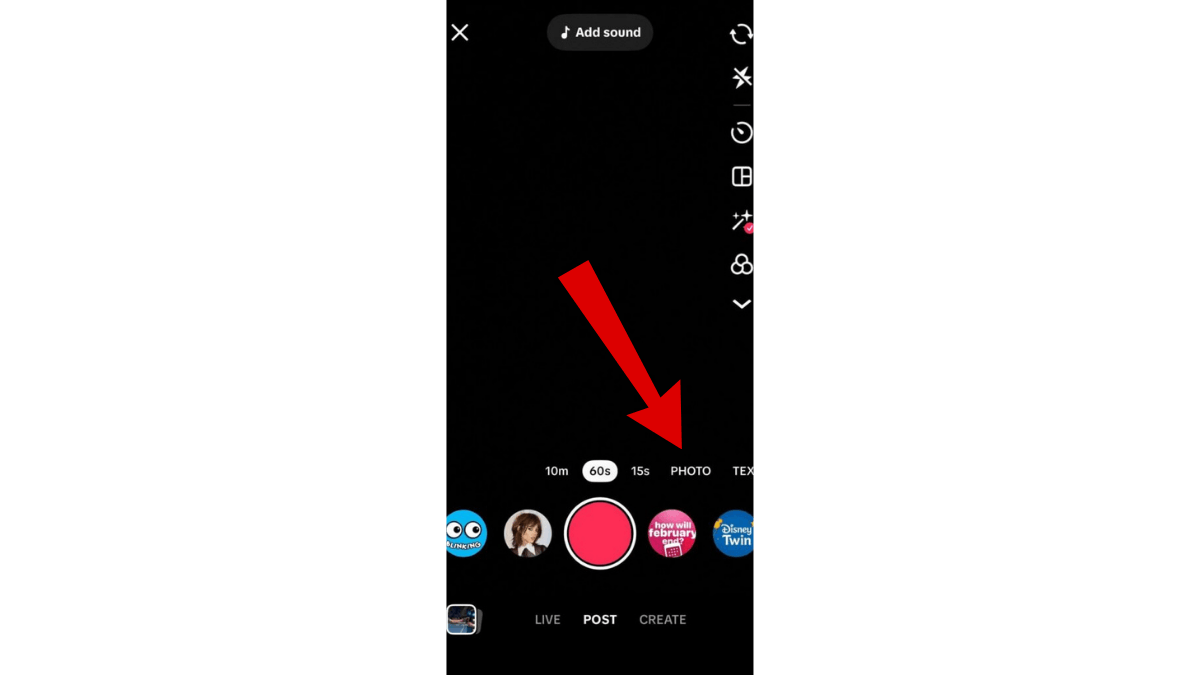
Direct answer: a photo post, which TikTok launched under the name Photo Mode, is a post made of still images with a soundtrack. TikTok's own Newsroom describes it as "a new carousel format available on mobile for photo content" where you "share carousel posts of still images that automatically display one after another. You can add music to soundtrack the images, which viewers can swipe through at their own pace." It suits ideas built on a list, steps or text, and does not suit ideas that depend on motion, timing, or your voice explaining something as it happens.
How is a photo post different from a video?
The difference is who controls the pace. In a video you do: the viewer sees what you show when you show it. In a photo post the slides advance with the sound, but the viewer can swipe and linger on a slide they want to read. That makes it closer to reading than to watching, and it changes the design rule: every slide has to make sense on its own.
How do you post a photo carousel, step by step?
Per TikTok's "Making a post" Help Center page:
- Open the app and tap the Add post (+) button at the bottom.
- Tap Photo, then tap Upload to select photos from your device.
- Order the photos. The order you select them in is the order they play in.
- Add sound, text and edits, write the caption, and post.
TikTok's photo tutorial post documents a second route if you do not see that tab: from the Record Video page tap Upload, toggle from Videos to Image, and choose your photos. For a single image, TikTok says the app "handles the rest by automatically adding sound and effects to your image."
Button labels differ between app versions and languages, so trust what your composer shows over any screenshot in an article.
How do you edit the slides and add sound?
TikTok's official editing page covers video and photos together, and lists the tools as sound, text, stickers, effects, filters, voiceover and captions. In practice:
- Text per slide: add it inside the app rather than burning it into the image, so you can still move it after previewing.
- Sound: pick a track from TikTok's library or record a voiceover. The audio keeps playing while the viewer moves between slides.
- The first slide is the cover. It is what appears in the feed and on your profile grid, so the whole idea should be legible from it alone.
- Text placement: short lines, large type, kept toward the middle of the frame. The caption, the handle and the action buttons cover the bottom and side edges in the real view.
For the rest of the in-app editor, the dedicated page is editing inside TikTok.
How many photos can you post, and what size should they be?
This is where unsourced numbers spread fastest, so here is the honest version:
- Image count: TikTok publishes no readable maximum on its official pages. The "35 photos" figure repeated across the web traces to a 2022 Business Insider article, not to TikTok. There is no four-image minimum either; a two-slide post is a valid post. The previous version of this page said "4 to 35" and both numbers have been removed.
- File size: no official published figure. The "around 500MB" number in circulation does not come from TikTok.
- Dimensions: a vertical full-screen frame fits best, because TikTok is a vertical experience, and square or landscape images sit inside a vertical frame with empty space around them. That is practical guidance, not an official statement, and the Help Center's recommended-specs page covers video rather than photos.
The workable rule: design vertical slides, check the preview before you post, and do not plan around a number you cannot trace to TikTok.
When does a photo post beat a video?
- List content: steps, numbered tips, recommended tools.
- Before and after comparisons: where a still image carries the difference without motion.
- Text and quotes: screenshots or information the viewer needs time to read.
- Ideas you cannot film right now: you have an idea worth posting and no time or setup, and the setup itself is covered in TikTok video production.
When does it not fit?
Anything that depends on motion, precise timing, your voice narrating a step as it happens, or a visual transformation. Video serves all of those far better than a stack of stills.
For choosing the idea before the format, the list is in TikTok content ideas, and the full idea-to-post map is in TikTok content creation.
What about the "easier reach" claims?
Claims circulate that photo posts get several times the reach of video, or that the recommendation system favours them. No official TikTok source confirms any distribution advantage for the photo format. The "How TikTok recommends content" page lists the factors, and post format is not among them. Choose the format that serves the idea, then compare its performance against your own previous posts rather than against a borrowed promise.
Hypothetical example: a creator wants to post "five resume mistakes". The idea is text by nature, and five slides, one mistake each, serve it better than a video that would require filming and editing something that is already writing. This illustrates the decision; it is not a promise of better performance.
Common questions
How many photos can I put in one post?
TikTok publishes no readable official number. The widely repeated 35 comes from a 2022 news article rather than TikTok, so choose the slide count your idea needs and confirm at upload.
Can I add sound to a photo post?
Yes. TikTok describes adding music as part of the format, and the official editing page lists sound and voiceover among the tools available for photos as well as video.
Do the slides advance on their own or does the viewer swipe?
Both. TikTok's own description is that the images display one after another and that viewers can swipe through them at their own pace.
Do photo posts get more reach than videos?
No official source says so. Pick the format because it fits the idea, then read the result in your own analytics against your own recent posts.
Practical Summary
- Bottom line: a photo post is a reading format, not a watching one, and it serves text, lists and static comparisons better than video does.
- The steps: Add post, then Photo, then Upload, then order the images and add sound and text.
- Every slide must stand alone, and the first one is the cover that decides whether anyone swipes at all.
- Do not repeat an image-count or file-size limit. TikTok has published neither.
- Next step: take the last idea you wrote down and never filmed, and ask whether it needs motion. If it does not, it is a photo post.
The other TikTok tracks are in the TikTok Resource Hub.
Official Sources
- TikTok Support: Making a post, including photo posts
- TikTok Support: Editing TikTok videos and photos
- TikTok Newsroom: Inspiring creativity with our new editing tools, where Photo Mode is defined
- TikTok Newsroom: TikTok Tutorial Series: Photos on TikTok
- TikTok Support: How TikTok recommends content