YouTube in 2026 is three products behind one logo: long-form video that people mostly watch on a television, Shorts that they watch on a phone, and video podcasts sitting between the two. Each format has its own discovery path and its own monetization rules, which is why advice that works for one can quietly fail on another.
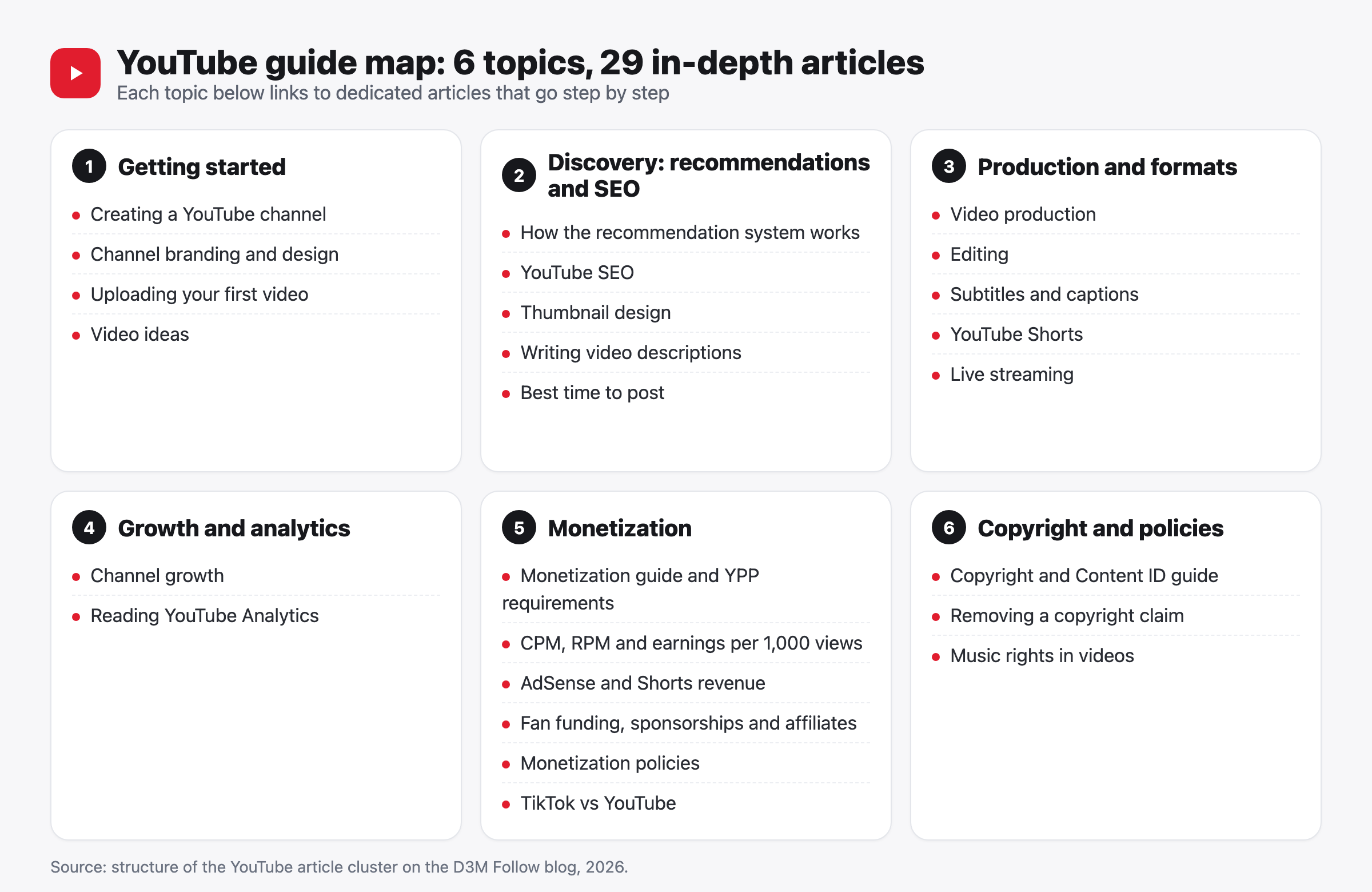
This page is the parent article for everything we publish about YouTube. It covers six topics: setting up a channel, discovery through recommendations and YouTube SEO, production across the three formats, growth and YouTube Analytics, monetization at every tier, and copyright protection. Every figure below carries its source, and where no public evidence exists we say so. Each section stands on its own, then links to the 29 specialist articles that go deeper.
Key Takeaways
- YouTube's Help Center sets the current Partner Program entry bar at 1,000 subscribers plus 4,000 qualified public watch hours in 12 months, or 1,000 subscribers plus 10 million qualified public Shorts views in 90 days.
- From 1 February 2027, new applicants need 8,000 qualified watch hours in 365 days or 20 million qualified Shorts views in 90 days. Existing partners are unaffected, so timing matters if you're close today.
- Revenue splits are published, not guessed: 55% of net long-form ad revenue, 45% of allocated Shorts pool revenue, and 70% of net revenue from memberships, Super Chat, Super Stickers, and Super Thanks.
- YouTube publishes no earnings-per-1,000-views figure and no recommendation thresholds. Anyone quoting exact ones is guessing.
- More than 50% of channels earning five figures in USD earn from sources beyond ads and YouTube Premium, according to YouTube's big bets for 2025 post. Diversifying isn't optional advice, it's what the earning cohort already does.
- Next step: pick the topic that matches your stage from the reading paths below instead of reading all six at once.
Guide Contents
- YouTube in 2026: Global Scale and Regional Reach
- How to Use This Guide
- Starting a Channel That Can Actually Grow
- Discovery: How Recommendations and YouTube SEO Work
- Production in Three Formats: Long-Form, Shorts, and Live
- Channel Growth and Reading YouTube Analytics
- Making Money on YouTube
- Copyright, Policies, and Protecting Your Channel
- When Growth Services Help, and When They Don't
- YouTube FAQ
- Bottom Line
- About This Guide and How We Update It
YouTube in 2026: Global Scale and Regional Reach
YouTube's scale matters to you for one practical reason: it tells you how much competition there is for the same minute of attention, and where that attention actually happens.
More than 20 billion videos have been uploaded to YouTube since launch, with more than 20 million uploaded every day, alongside 100 million-plus comments and 3.5 billion likes per day as 2024 averages, according to YouTube's 20th anniversary blog post (23 April 2025). Shorts adds its own layer: it averages 200 billion daily views, according to CEO Neal Mohan's letter on the future of YouTube in 2026 (21 January 2026). The same letter states YouTube paid over $100 billion to creators, artists, and media companies in the past four years.
The living room is now a primary surface. Viewers watch over 1 billion hours of YouTube on televisions every day, and television is the primary device for YouTube viewing in the US, according to YouTube's big bets for 2025 post (11 February 2025). Podcasts follow the same pattern: more than 1 billion monthly active podcast viewers as of January 2025, plus over 400 million hours of podcasts watched monthly on living-room devices, per YouTube's official announcement (26 February 2025).
The financial side is documented in Alphabet's filings rather than in press estimates. YouTube revenue across advertising and subscriptions exceeded $60 billion in fiscal 2025, and YouTube advertising revenue reached $11,383 million in Q4 2025 against $10,473 million in Q4 2024, according to Alphabet's Q4 2025 exhibit filed with the SEC (4 February 2026). Treat that as a measure of advertiser demand for the platform, not as a signal about your own channel.
Scale isn't the point here. What matters is that a video judged on a phone screen is increasingly watched on a 55-inch one, which makes your format choice a distribution decision too.
YouTube Reach and Partner Program Availability in Saudi Arabia and the Gulf
English-language YouTube guides often skip the Gulf entirely, so here is the regional picture with its sources attached.
Saudi Arabia is close to fully connected. The country had 34.4 million internet users out of a population of 34.7 million, or 99.0%, in late 2025, according to DataReportal's Digital 2026: Saudi Arabia. Within that market, YouTube's advertising reach was 27.5 million people, equal to 79.2% of the population, based on Google's ad planning data as published in the same report. That places YouTube ahead of every other platform on ad reach, as the chart below shows.
Connected TV is part of the Saudi picture too. YouTube reached over 12 million people aged 18 and above in Saudi Arabia on connected TV in May 2024, according to the Google MENA blog, published 14 October 2024. The same post cites a Kantar study commissioned by Google in which 85% of Saudi viewers reported a strong connection with YouTube creators and 86% agreed that YouTube plays a key role in purchase decisions. The sample size isn't disclosed there, so read those percentages as directional rather than precise. The connected-TV figure is more actionable: your picture and audio quality get judged on a large screen.
Access to monetization is settled as well. The YouTube Partner Program is officially available in Saudi Arabia, the UAE, Kuwait, Qatar, Bahrain, Oman, and Egypt, according to the Help Center's list of available countries. You don't need a workaround or a foreign address to earn from a channel in the Gulf.
How to Use This Guide
Pick one of three entry points based on where your channel is right now.
- If you're starting from zero, start with Starting a Channel That Can Actually Grow, then move to production, and postpone monetization until you've published ten to twenty videos.
- If your channel exists but growth has stalled, start with Channel Growth and Reading YouTube Analytics to identify whether the problem is click-through rate, retention, or traffic sources, then jump to discovery or production based on the diagnosis.
- If you're close to a monetization threshold, start with Making Money on YouTube, then read the copyright section, because the February 2027 changes affect you directly.
Starting a Channel That Can Actually Grow
Growth starts with a decision rather than a camera: who the channel is for and what it publishes, settled before any technical setup. When a channel stops after five videos, the cause is rarely the camera or the editing. They stopped because nobody knew what video six was supposed to be.
YouTube Channel Setup: The Settings That Matter Later
Creating a channel takes minutes, but three settings skipped in those minutes cost you later. Turn on 2-Step Verification for the Google account attached to the channel, since it's an explicit requirement for the Partner Program according to YouTube Help. Set your country and currency correctly from the start. Decide whether the channel is personal or brand-owned, because a brand account lets you add managers later without sharing a password.
Work through the step-by-step guide to starting a YouTube channel for the full sequence, including which options are hard to change later. Its first real step isn't technical at all: write a one-sentence channel description that a stranger would understand. When that sentence won't come, the problem isn't YouTube. It's the clarity of the idea.
Channel Branding: Name, Logo, Banner, and Description
Branding is what a visitor evaluates almost instantly before deciding to subscribe or leave. Your name should be easy to type into a search box. Your logo should stay readable at comment-thread size. Your banner should tell people what the channel publishes and when, rather than just looking attractive.
Branding doesn't generate views by itself. It changes the odds that a one-time viewer becomes a subscriber, which is a different job. If your audience is bilingual, you have an extra decision: a local-language name or an English one. Answer it from how people actually search, not from taste.
Go deeper: the YouTube channel branding guide has the official image dimensions and the consistency rules.
Publishing Your First Video: What to Set Before You Hit Publish
Your first video won't be your best, and that's fine. What matters is publishing it with the right settings. Give it a title that plainly describes the content and a description whose first sentence carries the point, because everything below the "Show more" fold gets collapsed. Add a custom thumbnail instead of an auto-generated frame. Answer the "made for kids" question accurately, since that setting affects comments, ads, and notifications.
One habit worth adopting: publish as unlisted first, watch it on a phone and on a television, then switch to public. That catches audio problems and font sizes that look fine on a laptop and fail everywhere else. The first YouTube video upload guide walks through every field on the upload screen.
Video Ideas: Building a Backlog Instead of Waiting for Inspiration
Content ideas come from a system, not from inspiration. The simplest system that works has three permanent inputs: questions your audience asks in comments, YouTube's own search suggestions when you type your topic, and videos performing well on channels roughly your size rather than on very large ones.
Write twenty ideas before you film video one, so you're not choosing a topic under deadline pressure. An idea that suits you may not suit a different audience, which is why small tests come before a whole series. Running dry after video ten is a system problem, and the YouTube video ideas guide covers generation methods and reusable series formats.
Common Mistakes When Starting a YouTube Channel
- Launching with three unrelated topics "to see what works," which leaves subscribers unsure what they signed up for.
- Leaving 2-Step Verification until the day you apply to the Partner Program, then discovering the account is tied to an old phone number.
- Copying a successful foreign channel's identity instead of building one that fits your language and audience.
- Waiting for a video to be perfect, which delays the first ten uploads you'd learn the most from.
Discovery: How Recommendations and YouTube SEO Work
YouTube documents how discovery works in general terms and documents nothing about it in numbers. Both halves of that sentence matter.
According to YouTube's own description of how recommendations work, the recommendation system uses viewing behavior, likes and dislikes, subscriptions, search history, and satisfaction-survey responses, along with channel reputation and quality, to decide how, when, and to whom videos are shown on Home and in Up Next. That's YouTube describing its own system. Everything beyond it is inference.
Here's the part to hold onto: YouTube does not publish threshold numbers. There is no public evidence confirming a retention percentage you must clear, a view count in the first hour that unlocks distribution, or a click-through rate that triggers wider reach. Anyone quoting exact ones is guessing. What the documentation does establish is the type of signal in play, and every signal on that list points back to a single question: did people watch, and were they satisfied?
 Video: The YouTube Algorithms in 2025: Explained! from Creator Insider, YouTube's official creator channel.
How the Recommendation System Treats Individual Videos
Recommendations operate at the level of a single video and a single viewer, not your channel as a whole. A video is shown to viewers whose past behavior suggests interest, their response is measured, and exposure widens or narrows from there. That's the most reasonable reading of the official description, and it explains why one video from a small channel can travel far while the rest stays flat.
Treat that as an editorial inference built on YouTube's general description, not a rule the documentation states word for word. The documentation names which signals are used. It never says how they're weighted. Why Home, search, and Shorts behave differently is the natural next question, and the YouTube algorithm guide without the myths separates what's documented from what's merely repeated.
YouTube SEO: Search, Titles, Descriptions, and Chapters
YouTube search is a discovery path separate from Home, and its rules sit closer to Google Search: the system needs text to understand what a video is about. Titles, descriptions, chapters, captions, and tags are all text the system reads, and some of it the viewer reads too. Writing that text only for the system produces keyword-stuffed titles nobody clicks.
Write the title for the viewer and the description for both. Put the main topic in the first sentence, because that's what appears above the "more" button. Chapters help viewers jump to what they came for, and segments can surface in Google results. Start from the complete YouTube SEO guide for keyword research and the "Traffic source: YouTube search" report, then pair it with writing a YouTube description that supports ranking when you sit down to structure descriptions, links, and timestamps.
Thumbnails and Click-Through Rate: The Decision Before the View
Thumbnail and title together decide whether a video gets opened at all, which happens before retention becomes relevant. Click-through rate in YouTube Studio measures how many people clicked after seeing the thumbnail, divided by how many saw it. A weak thumbnail means excellent content never gets measured.
Defensible principles: one large focal element, very short text or none, contrast that survives phone-sized rendering, and visual consistency across the channel. No fixed "good CTR" holds up, since the number moves with traffic source and content type, so compare your thumbnails against each other instead.
Go deeper: the YouTube thumbnail design guide covers A/B testing inside YouTube Studio and the official dimensions.
Choosing a Posting Time From Your Own Audience Data
Post when your own audience is on YouTube, because no universal schedule applies to everyone. The Audience tab in YouTube Studio shows when your viewers are active, which beats any article suggesting Thursday at 7pm. For long-form video, discovery continues for days and weeks, so publish time matters less than people assume. It matters more for live streams and community posts, where the notification is the event.
Try this. Hold one day and time for a month, then run an alternative for the next month, and compare only the first 48 hours of each video. Choosing the best time to post on YouTube walks through that report in detail, including how Ramadan and regional holidays shift the pattern, so read it before you redesign a schedule.
Production in Three Formats: Long-Form, Shorts, and Live
Choosing a format is a bigger decision than choosing equipment, because each YouTube format has its own discovery path and its own earning rules. Long-form gets watched on the television, Shorts on the phone, and video podcasts sit between them (see the numbers above).
Long-Form Video: Planning Before Filming
As a working habit, treat the opening seconds as the decision point and let the structure carry everything after. Viewers judge early whether a video deserves their time, and they keep needing fresh reasons to stay. Good production starts with a written outline: the promise you make at the top, the sequence that delivers it, and the likely boredom points that need a change of pace or angle.
Equipment comes after the outline. Clear audio from a recent phone beats 4K footage with echo, and window light works for most talking-head content. With television viewing rising, watch for busy frames and small on-screen text, which look acceptable on a phone and poor on a large screen. The complete YouTube video production guide covers the chain from outline to export at three budget levels.
Editing: Pacing Matters More Than Effects
Good YouTube editing is editing the viewer doesn't notice. Cut every second that adds neither information nor feeling, and hold a pace that suits the genre, faster for entertainment and calmer for explanation. Heavy transitions usually hide a weakness in the raw material rather than fixing it.
There's no single correct pace, so use the retention curve to find where people leave, then treat that moment in the next video. If you're choosing software, compare free and paid options in the YouTube video editing guide before paying for anything.
Subtitles and Captions: Wider Reach and Better Access
Captions serve three groups at once: people watching without sound, people who are deaf or hard of hearing, and people who don't speak your language. English captions open your channel to viewers who don't share your language, and Arabic captions do the same for English channels reaching Gulf viewers.
YouTube generates automatic captions, but quality varies with accents and technical vocabulary, so review them before relying on them. The caption file is also text the search system reads, which makes accuracy worth the time. When you reach the point of picking file types or judging whether paid captioning earns its cost, using subtitles and captions to expand your YouTube audience has the YouTube Studio steps.
YouTube Shorts: A Separate Format With Separate Rules
Shorts is an independent discovery path, not a compressed version of your long-form video. A Shorts viewer swipes away almost immediately without a reason to stay, so the opening carries most of the weight, and the ending should push toward a rewatch or toward your channel. On-screen text and audio both matter, because many people watch without headphones.
Shorts helps a channel in two ways: as a reach tool that introduces new viewers, and as its own monetization path with its own thresholds. Those Shorts audiences don't convert automatically into long-form viewers, though, so a million Shorts views implies nothing about what a twenty-minute video will do. The complete YouTube Shorts guide covers formats, lengths, and ways to connect the two.
Live Streaming: When It's Worth the Effort
Live streaming builds a relationship that recorded video doesn't, but it needs technical stability and an audience that already exists. Streaming to ten people isn't a failure if those ten are your most engaged viewers. It won't bring new viewers at the rate a strong long-form video can, though. Live is also where Super Chat and Super Stickers from the expanded Partner Program tier come into play.
Before your first stream, read the complete YouTube live streaming guide for activation requirements, streaming software, and chat moderation. Then start with simple equipment, fix a recurring time, and use scheduling in YouTube Studio so the notification lands before you go live.
Channel Growth and Reading YouTube Analytics
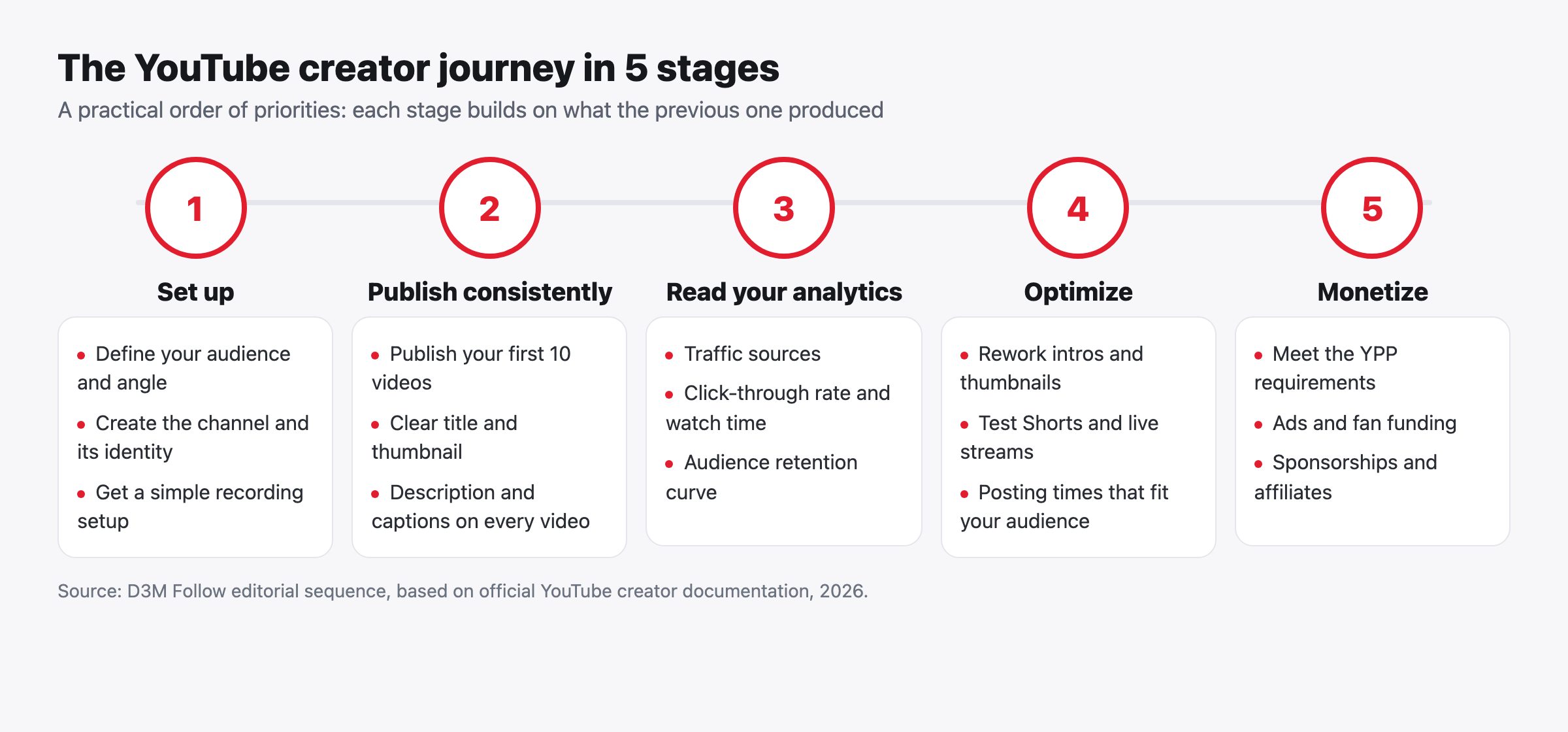
Channel growth isn't one number. It's the outcome of four stages, each measurable in YouTube Analytics: whether people see the video (impressions), whether they click (click-through rate), whether they stay (watch time and retention), and whether they come back (subscribers and returning viewers). Once you know which stage is leaking, you know which section of this guide you need.
Four YouTube Studio Metrics Worth Understanding Precisely
Click-through rate (CTR) is the number of views that started from an impression divided by the number of thumbnail impressions, reported at both video and channel level. Average view duration is total watch time divided by the number of views. The audience retention curve plots the share of viewers still watching at each moment of a video, and separates new from returning viewers. Traffic sources splits views by where they came from: Home, suggested videos, YouTube search, Shorts, external sites, and others.
None of the four comes with a universal "good" number. CTR for a video shown to subscribers isn't comparable to CTR for the same video shown to a new audience on Home, and average view duration on a five-minute video doesn't compare with a forty-minute one. Compare against your own videos of similar length and traffic source.
Reading the Retention Curve to Improve the Next Video
The retention curve answers one question: where do people leave? A sharp drop in the opening seconds usually points to a gap between what the thumbnail and title promised and what the viewer found, or to a long intro. A drop mid-video points to a boredom point you can locate to the second. Small rises mean viewers rewatched something, which is worth building on.
Hypothetical example: if a ten-minute video keeps half its viewers at the two-minute mark and then flattens until the end, the problem is the opening rather than the body, and the fix is delivering the main promise sooner. That illustrates how to read the shape of a curve, and it isn't a retention benchmark. The YouTube Analytics guide covers every YouTube Studio tab and how to export data for longer comparisons.
What Actually Moves Channel Growth
Growth is accumulation, not a single event. A video that travels lifts the number temporarily, but what keeps an audience is repeating the same promise at a consistent quality, so subscribers know what the next video will be. A sound plan focuses on three things: a clear series people can subscribe to, thumbnail and opening improvements driven by data, and Shorts or community posts that introduce the channel to new viewers.
No public evidence shows that any single action causes growth by itself (a set upload frequency, a set video length, a set posting time). A correlation someone else observed may not transfer to your audience. Instead of a formula, the YouTube channel growth guide offers a diagnostic frame: start from the metric that's declining, pick the matching action, then measure after ten videos rather than after one.
Making Money on YouTube
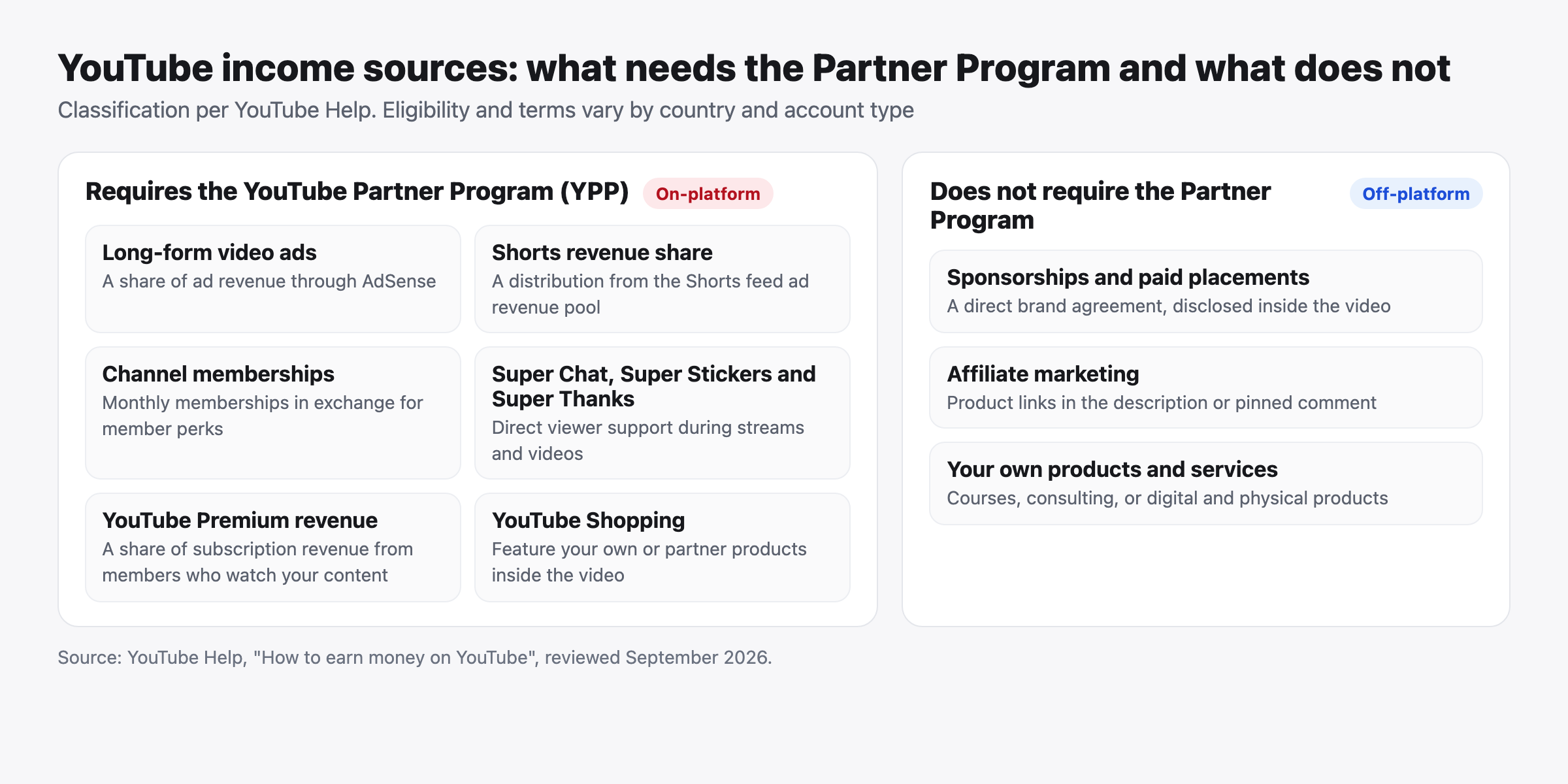
Monetization on YouTube runs through the YouTube Partner Program at two tiers, plus income that sits entirely outside the program and needs no threshold at all. Every number in this section comes from the YouTube Help Center or the official YouTube Blog, and the most time-sensitive fact is that thresholds change for new applicants on 1 February 2027.
For scale, YouTube paid more than $32 billion to partners worldwide in 2024, with 55% of ad revenue going to creators, according to YouTube's official revenue sharing page.
YouTube Partner Program Requirements: Two Tiers and One Date
The Partner Program currently has two tiers, expanded and standard, and higher thresholds arrive for new applicants to the standard tier on 1 February 2027. The table below brings all three together with their sources.
| Tier | Subscribers | Qualified public watch hours | Or qualified public Shorts views | What it unlocks | Source |
|---|---|---|---|---|---|
| Expanded tier (fan funding) | 500 | 3,000 hours in 12 months, plus 3 valid public uploads in the last 90 days | 3 million in 90 days | Channel memberships, Super Chat, Super Stickers, Super Thanks, Shopping | YouTube Help: expanded program |
| Standard tier (current) | 1,000 | 4,000 hours in the last 12 months | 10 million in 90 days | All of the above, plus ad revenue and YouTube Premium revenue | YouTube Help: program requirements |
| New applicants from 1 February 2027 | 1,000 | 8,000 hours in 365 days | 20 million in 90 days | Same as the standard tier | YouTube Help: 2027 updates and YouTube Blog, 10 August 2026 |
The program requirements page also requires no active Community Guidelines strikes, 2-Step Verification, access to advanced features, and one linked AdSense for YouTube account. The expanded tier is available in Saudi Arabia, the UAE, Kuwait, Qatar, Bahrain, Oman, and Egypt, per the expanded Partner Program page.
The 2027 changes don't stop at entry. According to the program updates page, existing partners keep their membership under the current thresholds, but Shorts Creator Pool payouts will require maintaining 10 million qualified Shorts views over 90 days. Staying active requires one of three things: 1,000 qualified watch hours per 365 days, 1 million qualified Shorts views per 90 days, or 2 long-form videos or 5 Shorts uploaded every 90 days. Anyone sitting near 4,000 hours today should apply before February 2027 rather than face a doubled bar later. The YouTube monetization requirements guide shows how to track progress inside YouTube Studio and which views count as qualified.
Revenue Splits as YouTube Documents Them
Your share differs sharply by income type, and each share is published. According to the revenue sharing terms in YouTube Help, creators receive 55% of net advertising revenue on the long-form watch page, 45% of the Creator Pool revenue allocated to them for Shorts, and 70% of net revenue from channel memberships, Super Chat, Super Stickers, and Super Thanks. The YouTube Blog update of 10 August 2026 added 30% of net YouTube Premium subscription revenue and 60% for Premium Lite.
In practice, a unit of revenue from a channel membership leaves more in your pocket than the same unit from an ad. That's one reason the expanded tier matters so much for small channels with an engaged audience. The complete YouTube monetization guide explains each source, how to enable it, and its constraints.
CPM and RPM: What Each One Measures
CPM (cost per mille) is what an advertiser pays per thousand ad impressions. RPM (revenue per mille) is what reaches you per thousand video views after YouTube's share, and it includes every income source, not only ads. Practically, CPM describes the ad market and RPM describes your channel. A view where no ad was served still counts in RPM, and it never enters CPM at all.
Neither has an official figure, and you won't find one in YouTube's documentation. Values shift with viewer country, advertiser interest in the topic, season, video length and number of ad breaks, and how many of your viewers hold a YouTube Premium subscription. Any article offering an "average RPM" for a language or region is offering a guess. To find your own number, follow the method in the guide to how much YouTube pays per 1,000 views, CPM and RPM explained. What can be sourced is the direction of advertiser demand overall, shown below.
Read that chart as advertiser demand for the platform, not as an indicator of creator earnings. A rising quarterly total tells you the ad market is growing, and says nothing about what a specific video in a specific country earns.
Ad Revenue and AdSense: What You Can Actually Control
Your control here is limited but real: enable ads on every eligible video, place mid-roll breaks at moments that don't cut an idea in half, and stay inside the advertiser-friendly content guidelines so videos don't get limited ads. What you don't control is the price of the ad, which advertisers set in an auction you never see.
Chasing a high-CPM topic without an audience for it earns nothing. The guide to maximizing your YouTube AdSense earnings covers ad settings, the revenue-by-ad-type report, and linking AdSense correctly.
Shorts Monetization: The Revenue Pool and the Music Rule
Shorts income is calculated from a shared revenue pool rather than from an ad on your specific video, which explains why the numbers behave so differently from long-form. According to the Shorts monetization policies in YouTube Help, ad revenue across Shorts is gathered into a pool, part of it covers music licensing, and the rest is allocated to creators by their share of qualified views, with each creator receiving 45% of their allocation.
Music changes the arithmetic directly. The same source specifies that a Short using one music track sends half of its engaged-view revenue to the Creator Pool and half to music licensing, while a Short using two tracks sends only a third to the pool. Your 45% share of the allocation stays the same either way, and views from non-original clips, reuploads, and artificial views don't qualify at all. So a Short with your own audio keeps a larger share of what it generates. The Shorts monetization guide breaks the pool mechanics down step by step.
Income Outside Ads: Fan Funding, Sponsorships, and Affiliate
More than 50% of channels earning five figures in USD earn from sources other than ads and Premium, according to YouTube's big bets for 2025 post (11 February 2025). That's the strongest available argument for diversifying: ads are a source whose price you don't set, while memberships, sponsorships, affiliate income, and products are sources you influence directly. For context, Neal Mohan's 2026 letter noted over 500,000 creators using YouTube Shopping, and more than 1 million channels using AI creation tools daily in December 2025.
Fan funding (channel memberships, Super Chat, Super Stickers, and Super Thanks) opens at the expanded tier with 500 subscribers, and your share is 70%. It suits a small channel with a connected audience better than ads do. If you're deciding what to offer at each membership level, start with the YouTube fan funding guide.
Sponsorships don't require the Partner Program at all. They require a well-defined audience you can describe to a brand using numbers from Analytics. Pricing, contracts, and the paid-promotion disclosure YouTube's policies require are in the YouTube sponsorships guide. Affiliate income fits content that reviews products or teaches tools, and the YouTube affiliate marketing guide covers programs and link disclosure.
Monetization Policies: What Stops the Money
Earnings stop for two main reasons: breaking the channel monetization policies, most often through reused or inauthentic content, or breaking the advertiser-friendly guidelines on a specific video. The difference matters. The first applies to the whole channel and can remove you from the program. The second applies to one video and limits its ads.
"Reused content" is the classification worth reading closely, particularly for compilations and reaction uploads with no visible addition. The addition has to be editorial, commentary-based, or educational in a way a reviewer can see, not a change of speed or framing. Anyone contesting that classification should work from the full category list and review-request process in the YouTube monetization policies guide rather than guessing at what counts as an addition. If you're weighing platforms, the comparison of TikTok and YouTube monetization sets out the differences in thresholds, splits, and content lifespan.
Copyright, Policies, and Protecting Your Channel
Protecting a channel means understanding three separate systems that guides often blur together: Content ID claims, copyright strikes, and Community Guidelines strikes. Each has a different cause, consequence, and response. Confusing them is what makes creators delete videos they didn't need to delete while ignoring a warning that actually threatens the channel.
Copyright Claim Versus Copyright Strike
A claim doesn't harm your channel. A strike does. A claim usually arrives automatically from Content ID when part of your video matches content registered by a rights holder, and the outcome is an action the owner chose, applied to that video. A strike comes from a legal removal request submitted by a rights holder. It counts against the channel, and accumulation threatens the channel's existence.
Put practically: if YouTube Studio shows a claim and the video is still available, the owner chose to monetize it rather than block it, and there's no strike on your channel. If the video was removed with a strike notice, you may need copyright school and possibly a counter notification. Start from the YouTube copyright guide before responding, since it walks both paths from first notice to appeal.
How Content ID Works: Block, Monetize, or Track
Content ID is an automated matching system that compares uploads against reference files supplied by rights holders. According to the Content ID overview in YouTube Help, when a match is found, one of three pre-selected actions applies: block the video (entirely or in specific countries), monetize it by running ads whose revenue goes to the owner, or track its viewership statistics only. The action varies by owner and region, so the same clip can be blocked in one country and monetized in another.
According to YouTube's 2025 Copyright Transparency Report, as summarized by TorrentFreak, Content ID produced about 2.5 billion claims in 2025, uploaders disputed roughly 0.5% of them, and about two thirds of those disputes were resolved in the uploader's favor (original transparency report, TorrentFreak summary, 6 June 2026). The editorial reading: disputes are rare, but when they happen they usually succeed, so don't ignore a claim you believe is wrong.
Removing a Copyright Claim: Your Four Options
You have four routes when Content ID flags a video: trim the matched segment, replace the music, mute the audio across the matched section, or dispute the claim if you own the rights or believe the use is permitted. The first three are handled inside YouTube Studio without reuploading, and the claim clears automatically once the match is gone.
A dispute goes to the rights holder, who has a window to respond, and if they reject it you can appeal. An appeal can escalate into a removal request and a strike if the owner is in the right. Dispute when you're confident. Use the trim and replace tools when the claim is correct and the matched segment isn't essential. The guide to removing a YouTube copyright claim covers each route, including what happens to the video's revenue during processing.
Music on YouTube: The Rule That Prevents Avoidable Claims
Music is a cause of Content ID claims worth designing around, and the belief that using "just a few seconds" or crediting the artist makes it permitted is wrong. Matching is automatic regardless of clip length or intent. The systematic fix is the Audio Library in YouTube Studio, a commercial license you keep proof of, or your own music.
On Shorts the calculation is financial as well as legal. Licensed tracks from YouTube's library are permitted, and the Shorts policy page sets the terms. The revenue split that applies is covered in the Shorts monetization section above. The YouTube music copyright guide handles licensing, public domain, fair use, and building a reusable music library.
Community Guidelines Strikes: The 90-Day Countdown
Community Guidelines strikes are independent of copyright and pose the greater risk to a channel's existence. According to the Community Guidelines strike basics page, a first violation is usually a warning that expires after 90 days if you complete policy training. A first strike freezes uploads, live streams, and posts for one week. A second strike within 90 days extends the freeze to two weeks. Three strikes within 90 days may result in permanent channel removal. Deleting the offending content doesn't remove the strike.
Treat a first strike as the start of a 90-day countdown, not as the end of a channel. Check drafts and scheduled videos immediately, because a non-compliant video publishing automatically during a freeze can become strike two.
When Growth Services Help, and When They Don't
Content quality and growth services solve different problems, and mixing them up leads to bad decisions in both directions. If your objective is a defined count tied to a campaign or launch, a service can support it. What you get is set by the quantity, expected start time, and refill terms shown on the listing. When the real question is "why isn't my channel growing," the answer sits in the analytics section of this guide, not in any service.
No public evidence shows that purchasing a metric causes organic distribution from the recommendation system, and artificial views don't count toward the qualified Partner Program thresholds, per the YouTube documentation reviewed above. No service compensates for a weak thumbnail, a long intro, or content that doesn't fit its audience.
If your goal is the campaign type, define what the video or campaign actually needs first, then compare the YouTube service options available at D3M Follow by quantity, start time, and the terms of each listing. If your goal is the growth type, open Analytics and review your last ten videos before deciding anything.
YouTube FAQ
What are the YouTube monetization requirements in 2026, and what changes in 2027?
In 2026 you need 1,000 subscribers plus either 4,000 qualified public watch hours in the last 12 months or 10 million qualified public Shorts views in 90 days, according to the Partner Program requirements. From 1 February 2027, new applicants need 8,000 qualified watch hours in 365 days or 20 million qualified Shorts views in 90 days, while existing partners are unaffected. To track your progress toward either threshold inside YouTube Studio, see the YouTube monetization requirements guide.
Do Shorts views count toward the required watch hours?
No, Shorts views run on a separate track and don't add to qualified public watch hours. The Partner Program documentation sets two alternative conditions, watch hours or Shorts views, and you need to meet one of them in full rather than half of each. The Shorts monetization guide explains how to follow each track separately in YouTube Studio.
Is a Content ID claim the same as a copyright strike?
No, a Content ID claim is an action applied to a single video and isn't counted against your channel, while a strike is a penalty recorded against the channel itself. A claim results in the video being blocked, monetized for the rights holder, or tracked, according to the Content ID overview. A strike comes from a legal removal request and accumulates. The guide to removing a copyright claim covers what to do in each case.
Is the YouTube Partner Program available in Saudi Arabia and the Gulf?
Yes, both tiers of the YouTube Partner Program are officially available in Saudi Arabia, the UAE, Kuwait, Qatar, Bahrain, Oman, and Egypt, per the Help Center's country list. The steps for linking an AdSense account and completing identity verification are in the complete YouTube monetization guide.
How much does YouTube pay per 1,000 views?
There is no fixed figure, and YouTube's documentation publishes no average earnings per 1,000 views. To read your own number from the YouTube Studio revenue report, follow the method in the guide to how much YouTube pays per 1,000 views.
Do you need expensive equipment to start a YouTube channel?
No, a recent phone with a basic microphone and window light is enough for your first twenty videos in most content categories. Clear audio matters more than image resolution, and a written outline matters more than both. The exception is content mostly watched on television, such as long interviews and visual reviews, where image flaws show more. Start with what you have, and read the YouTube video production guide once you know which format you'll stick with.
Bottom Line
What separates a channel that grows from one that stalls isn't a hidden trick inside the recommendation system. It's executing the basics in order: a clear identity, a format that suits your audience, a thumbnail and opening tested against data, then Analytics read patiently instead of judged from a single video.
Your next step depends on your stage. If you're starting, open the channel setup guide and publish something this week. If your channel exists, open Analytics and name the metric that's declining. If you're near a monetization threshold, check the 2027 requirements before you postpone applying. The links below are grouped by topic so you can go straight to what you need.
Continue Reading by Topic
Starting a Channel
- How to start a YouTube channel step by step
- Building YouTube channel branding: name, logo, and banner
- Uploading your first YouTube video with the right settings
- YouTube video ideas and a system for generating them
Discovery and YouTube SEO
- How the YouTube algorithm works without the myths
- The complete YouTube SEO guide
- Designing YouTube thumbnails that get clicked
- Writing a YouTube description that supports ranking
- Finding the best time to post on YouTube from your audience data
Production in Three Formats
- YouTube video production from outline to export
- YouTube video editing: software and workflow
- Subtitles and captions that expand your YouTube audience
- The complete YouTube Shorts guide
- YouTube live streaming: setup and moderation
Growth and Analytics
- YouTube channel growth: a diagnostic framework for stalled channels
- The YouTube Analytics guide to every YouTube Studio tab
Monetization
- YouTube monetization: the complete guide to every income source
- YouTube monetization requirements through 2027
- How much YouTube pays per 1,000 views: CPM and RPM
- Maximizing your YouTube AdSense earnings
- YouTube Shorts monetization and the revenue pool
- Fan funding: memberships, Super Chat, and Super Thanks
- Affiliate marketing on YouTube
- YouTube sponsorships: pricing, contracts, and disclosure
- YouTube monetization policies and what stops earnings
- TikTok versus YouTube monetization compared
Copyright and Channel Protection
- The YouTube copyright guide: claims and strikes
- Removing a YouTube copyright claim step by step
- YouTube music copyright: licensing and safer alternatives
About This Guide and How We Update It
This guide is maintained by the D3M Follow editorial team and serves as the parent page for our YouTube series. The accepted sources are fixed: the official YouTube Help Center and YouTube Blog, Alphabet's filings with the US Securities and Exchange Commission, DataReportal reports, and the Google MENA blog. We don't add a figure without a source from that list, and we remove any figure whose source disappears. Partner Program thresholds and revenue splits are re-checked whenever YouTube announces a change, and the next known change is the new-applicant thresholds on 1 February 2027. This page was last reviewed on 10 September 2026.
If you notice a figure or threshold that changed after that date, tell us through the contact page and we'll re-check the source and update the page. For general questions about the site, see the FAQ, and site and service use is governed by the terms and conditions.